Remove Feeds From Individual Blog Posts in WordPress
Written by 
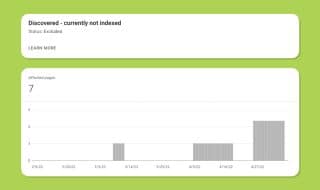
WordPress, for whatever reason, automatically creates a feed for every blog post that you create. If you check Google Search Console, you may have noticed that Google can see all of these feeds and they are reporting issues in your dashboard.
You can mostly ignore those errors, since it's basically Google's way of saying "These are RSS feeds, not content pages, so we're not able to index these, just in case you were hoping that we would".
Still, we don't need hundreds of feeds created for our hundreds of content pages, so we should remove this feature. Here's what we can do to fix it; simply add this to your functions.php file in your theme;
/*
 * Remove feed from individual blog posts
 */

add_action('template_redirect', 'remove_post_feed_status');

function remove_post_feed_status(){
    if (is_singular('post') && is_feed()) {
        header('HTTP/1.1 410 Gone');
        exit();
    }
}
Now, Google will see a "410 Gone" header when visiting these feed pages. This is a much stronger and more purposeful message than "Not Found", which search engines tend to cling to a bit longer in-case it was a mistake or it happens to come back later. A 410 status tells Google that these are gone and never coming back. This way, they won't show up as "404 Errors" in Google Search Console, and these should start to drop off eventually. Though, it may take Google a while to check them again.
Optionally, you can use this version, which redirects the user to the post itself instead of showing a "410 Gone" message:
/*
 * Redirect feed requests to individual blog posts
 */

add_action('template_redirect', 'redirect_post_feed_to_post');

function redirect_post_feed_to_post(){
    if (is_singular('post') && is_feed()) {
        global $wp;
        $post_url = get_permalink();
        wp_redirect($post_url, 301);
        exit();
    }
}
With this version, Google Search Console will still report that they couldn't index these because they redirect to a different URL - but it's not a concern.
If the goal is to clean up the messages and warnings in Search Console, I would recommend version #1. If you suspect that real people are visiting your individual /feed/ URLs of each of your blog posts (which I doubt they are, why would they be if they aren't indexed?), then I would recommend option #2.
Personally, I used version #1, but I don't see any issue with using #2, either. They both serve their purpose.
What do you think? Did this help you? Any questions for me? Please let me a comment below and I'll get back to you in 24 hours or less!
Related Code Snippets

Automatically Write Post Summaries in WordPress with ChatGPT
WP Rocket Not Caching Your Paginated Pages? Let's Fix That
Auto Trim and Redirect Spammy URL Endings in WordPress
Automatically Redirect 404's in HubSpot CMS to a The Closest Page
How to Add ProfilePage Schema to Your WordPress Posts
Replace The Default WordPress jQuery With Updated Version

Written by James Parsons
Hi, I'm James Parsons! I founded Content Powered, a content marketing agency where I partner with businesses to help them grow through strategic content. With nearly twenty years of SEO and content marketing experience, I've had the joy of helping companies connect with their audiences in meaningful ways. I started my journey by building and growing several successful eCommerce companies solely through content marketing, and I love to share what I've learned along the way. You'll find my thoughts and insights in publications like Search Engine Watch, Search Engine Journal, Forbes, Entrepreneur, and Inc, among others. I've been fortunate to work with wonderful clients ranging from growing businesses to Fortune 500 companies like eBay and Expedia, and helping them shape their content strategies. My focus is on creating optimized content that resonates and converts. I'd love to connect – the best way to contact me is by scheduling a call or by email.