
Fact or Myth: Can Using Cloudflare's Free Plan Hurt Your SEO?
Written by 

In my mind, Cloudflare is a blessing and a curse.
On one hand, it's an incredibly powerful tool for caching, for DDoS protection, and for site security. On the other hand, it's riddled with outages, forces users to re-do captchas every handful of pageviews, and can even dissuade users from sticking around.
But how does it affect your SEO?
Today I want to look specifically at Cloudflare's free service, because it's the one most people are going to use. A lot of what I dig into can also apply to paid versions, too, though, so don't assume you'll get around the issues if you're paying for it.
Key Takeaways
- Cloudflare can hurt SEO, but usually only when misconfigured - not because of inherent flaws in the service itself.
- Overzealous bot-blocking rules can accidentally prevent Googlebot and AI crawlers from indexing your site, damaging visibility.
- Blocking AI scrapers like Perplexity or ChatGPT may reduce your presence in AI-powered search experiences replacing traditional SEO.
- Conflicting plugins handling caching, CDN, or image compression alongside Cloudflare can cause loading errors and broken functionality.
- The shared IP "bad neighborhood" concern is a myth - Google does not penalize sites based on shared Cloudflare IP addresses.
Can Cloudflare Hurt SEO?
The simple answer is that yes, Cloudflare can hurt your SEO, but it's not really Cloudflare's fault.
It's sort of like hitting your car with a hammer and then blaming the hammer for damaging your car. It doesn't really matter that it was a hammer; any tool you use would have the same effect on your car.

Cloudflare is a powerful tool with a lot of useful features, and a lot of those features, when misused, can cause problems with SEO.
So, let's run down through the ways a misconfigured Cloudflare can damage your SEO, how you can test it, and what you can do to fix it. If you use WordPress, you may also want to know how to add a Flush Cloudflare Cache button to your WordPress admin to make cache management easier.
You Accidentally Set a Rule and Blocked the Googlebot
Bots are one of the biggest problems with the internet as we know it. Pretty much every business that sells information has bots to scrape it, search engines have bots to index sites, AI companies have bots to scrape for training and to scrape for answer generation, billions of spambots crowd every doorway hoping to get a comment past the honeypots, and the list goes on.
It's no wonder that people think Dead Internet Theory is real at this point.
A lot of bots are mostly harmless, as long as you're doing things the right way. Blog comment spam bots, for example, all get pretty easily trapped by honeypots and never hurt your site. A good security plugin can stop bots from brute-forcing your login information.
Other bots are a lot worse. DDoS bots are obviously bad, since their goal is just to use up server resources. Some of the LLM bots are also very poorly made and absolutely hammer sites. There are also third-party scraper bots that just want to steal your site for their own use.
Any bot is using up server resources that would be better served going to a user, right? Sure, you probably have server resources to go around most of the time, but if anyone has to be sacrificed for performance, it should be the bots.
Cloudflare allows you to set custom bot filtering rules. By far the most common reason I've seen (and fixed for clients in the past) is overzealous bot filtering.
Like it or not, Google and the other search engines, and the AI answer platforms, all need to scrape your site to use your information in answers and present your links to users. If you just block bots that hit your site too often, and don't pay attention to where they're coming from, there's a pretty good chance you're going to hit bots you need.

It's kind of like running a retail business and arbitrarily blocking anyone with blonde hair. Sure, maybe you block some thieves, but you block legitimate customers too.
There's more than just the Google bots to think about, too. Here's a big list of what to consider, and here's an example of all of Google's IPs to give you an idea of what you'd want to allowlist.
You Set Cloudflare to Block AI Scraping
AI has been very contentious, especially in the marketing space, over the last few years.
Some people adopted the stance that blocking AI is good; the more you prevent the AI from just taking your data, the more you resist the LLM companies freely sucking up all of your hard work and giving you nothing.
On the other hand, so much of the internet right now is powered by LLMs that not being visible to them could be detrimental. If you block Perplexity's bots, you block yourself from showing up in Perplexity, so anyone using Perplexity to search for information won't find you. Audience lost.
Google just recently announced a shift to a fully AI search experience. This is essentially killing off the traditional search experience and replacing it with AIO, which is going to be a massive change.
Now, I have my fears here. On one hand, I'm confident in my ability to get sites cited by Google's AI overviews. Several of my clients are routinely in the top two citations for related questions, which is the AI equivalent to being position 1 or 2 in the SERPs.
On the other hand, this is likely to dramatically reduce the amount of traffic going to publishers, which has the potential to have a lot of very serious repercussions throughout the entire internet moving forward. This is something people have feared ever since Google started showing knowledge graphs, and the AI experience is a kind of final stage of that disregard for publishers.
In the worst case, this could kill thousands of small businesses outright, and seriously hurt many thousands more. The few sites that still get citation links are going to dominate, and those that can't compete? It's rough.
Setting the digression aside, let's get back to Cloudflare. This is essentially the same issue as blocking the Google bots. If you block Perplexity, or block Claude, or block ChatGPT, you won't show up when people search using those AIs. It's not technically an SEO hit, but since AIO is replacing SEO, it's functionally the same thing.

The solution to both issues is the same, too; just don't block those bots. Reserve your blocks for the malicious IPs that are trying to brute force your login page or leave comment spam on your posts. Let the crawlers be.
Cloudflare Tools are Conflicting with Overlapping Plugins
Now let's look at an issue that isn't centered around bots and crawlers.
Cloudflare's free plan has a lot of relevant, useful features, many of which improve a site's performance or functionality. The list of features expands if you pay for their $20/month pro plan, too.
Personally, I love it. Cloudflare's core features, from the DNS and CDN to image compression, caching, and, of course, security, are all great.
But all of those things can be done in other ways.
One thing I've seen happen is sites that have plugins for some of those features, who then install Cloudflare and end up with conflicts. In particular, CDNs, image compression, and caching are prime suspects for plugin conflicts.
If you have a plugin doing those things, and install Cloudflare, and Cloudflare also does those things, you end up with some confusion at the technical level. When a web browser reaches out to your host server and requests to load a page, some of those page elements are on a CDN, but which one? The pages may be cached, but which cache is the one to use? If you use WP Rocket, for example, clearing your CDN cache alongside it is something you'll need to manage carefully.

These kinds of conflicts can lead to delays in loading, errors, and entirely non-rendered pages. Or, it can just break the functionality entirely, and you end up without compression, without caching, without a CDN at all.
Make sure that any feature you're using with Cloudflare is not duplicated with another plugin somewhere. If it is, figure out which you want to keep and disable the other.
Cloudflare Challenges Slow an Optimized Website
This next one is an issue that relatively few people can have, but I'm one of those people.
If you're like me, this sentence resonates with you: "I love to tinker with code to make things run as efficiently as possible."
I pride myself on being able to crank a website up into the high 90s or even hit 100 on PageSpeed Insights. I do a lot of custom tinkering with both my site and, if they want me to, my client sites, to get that speed metric up.
Cloudflare throws a monkey into the works if you're not very careful about what you enable and how you configure it. Cloudflare's challenges, their CDN, their caching, and other features can all cause problems.

On one hand, you have reports of users who had their sites instantly way faster when Cloudflare is installed. On the other hand, a common subject of support threads on Cloudflare's community forums is sites being way slower once Cloudflare is installed.
There are a lot of possible causes, but some of them are just contextual. To do the things Cloudflare does, you have to have delays, by definition. Sending a request to two servers is slower than sending a request to one, right?
If you're like me and love getting really in the weeds with speed optimizations, just installing Cloudflare can slow things down. If you install Cloudflare without very specific configurations to match your tweaks, it can be even worse.
Cloudflare Downtime Causing Problems
I already mentioned the Cloudflare downtime issue up at the start of this post. It's a reality that a service the size of Cloudflare is going to have issues, just like any other major service. It's just the kind of world we live in.
If Cloudflare is down, your site can end up inaccessible. This could mean loops in the captchas, or CDNs that don't load, or caching that doesn't work. The exact symptoms vary depending on both how you're using Cloudflare and what part of Cloudflare is down.

Does this hurt your SEO, though?
Maybe, but it's somewhat unlikely. If Cloudflare happens to have an issue right when Google is crawling your site, it can cause the indexation of a new page to be delayed. If it happens more than once, Google might put your site on the back burner.
Realistically, though, any issues you experience are going to be short-lived and temporary. It's usually more related to indexation than ranking, too. If you're seeing ranking issues, it's probably not because of Cloudflare downtime.
Another SEO issue you might have heard about relating to Cloudflare is the shared IP issue.
In case you haven't been as steeped in the internet tech stuff as long as I have, here's a crash course.
Every device connecting to the internet has an IP address. Web servers can have one IP address for the whole server, or they can use virtual servers to create different IPs for segments of the server. Dedicated servers give you a whole piece of hardware and its IP just for your site, virtual private servers put all the sites on one server but give them all virtual environments with their own IPs, and shared servers put all the connections on one IP with routing to the right destination based on DNS.
Yes, it's simplified. The details don't matter for this discussion.
The root of the concern is that if your site is using the same IP address as another site, and that other site is penalized, your site could also be penalized. It's the "bad neighborhood" concept.
Cloudflare is similar in that when you use their CDN, caching, or other services, the IP that hosts your content is a Cloudflare IP shared with many others using it. Some of those can be penalized, malicious, or otherwise bad sites.

Does that hurt your site and SEO?
No, not at all. Google's representatives have stated many times that they aren't operating based on IP address and they aren't penalizing sites for the actions of others on the server or host.
The only reason this myth persists is because in the early days of the internet, shared hosts had a lot of other shady behavior attached to them, like server-wide ads, which caused a lot of problems and earned penalties. That kind of got conflated and spiraled out, and now people think there are bad neighborhoods despite that never really having been true.
How to Test if Cloudflare is Causing SEO Problems
So, how do you test if your site is being harmed by Cloudflare?
I have five main ideas to check for the main reasons why you might be having issues. They should give you a decent idea if Cloudflare is at fault, or if your issues stem from other sources. I'll be honest: there's a pretty good chance it's not Cloudflare's fault, but I've seen it happen before, so I won't rule it out by default.
Cross-Reference Bot Blocking Rules
The first and, usually, most important thing to check is whether or not you're blocking important bots.
The hard part here is that there are thousands of IP addresses for good services, from Google and Bing to DuckDuckGo to the LLMs to tools like Semrush and Ahrefs. While blocking a lot of those won't hurt your SEO directly, they can have knock-on effects on marketing and even on reporting.

One thing you can do is disable your bot blocking temporarily and see if it helps. You can also go through and review your rules and cross-reference resources others have created on blocking bots.
While you're at it, check your robots.txt file and see if anything got added there that shouldn't have. You'd be surprised at what can crop up.
Inspect Individual Pages for Indexation
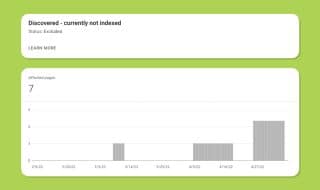
Indexation is usually the biggest issue with Cloudflare when it comes to SEO. It's not as much about losing rankings as it is about delays on updated content and delays on new content being ranked at all.
The way to check this (and, coincidentally, fix it at the same time) is to use the Google Search Console URL Inspector. The URL inspection tool allows you to put a URL into the Search Console and look up information about it, primarily including its indexation status.

You'll want to spot-check a few URLs. I like to pick:
- The most recent page you've published.
- Two or three of your top performers.
- A couple of pages that have lost rankings or traffic recently.
This gives you a decently representative sample of what might be going on. If Cloudflare is the issue, you're more likely to see indexation issues, such as pages that are indexed with issues or pages that aren't on Google.
If your pages are facing indexation issues, using the URL inspector is a sly way to tell Google the page exists. It's not necessarily going to get your page indexed (something I discuss in this post), but it can't hurt.
If indexation issues are the problem, then you need to figure out why they're happening. Cloudflare might not actually be the root cause, but you can start by looking there.
Double-Check Plugin Functionality
Third is plugin conflicts. There are a few ways to check for conflicts.

These include:
- Using a conflict-checking plugin.
- Manually inspecting each plugin for feature lists and looking for overlaps.
- Systematically disabling plugins and checking functionality.
- Using webdev tools to check how your site is loading and watch for errors, and trace them.
This is tedious work, no matter how you slice it, but it might be the only way to track down a conflict. I've seen some pretty strange conflicts, too, so it's not always the plugins you expect that are causing the issue.
Disable Cloudflare Temporarily
Cloudflare allows you to pause its functionality without having to go through and uninstall or deactivate it entirely. It's useful for testing and for purposes like website transitions.

Pause Cloudflare and check to see if your issues clear up. In the case of SEO, this might mean waiting a week or two; for some other issues, it might be a day or two.
Keep in mind that this pauses everything Cloudflare. There are some limited temporary disables you can do, like turning off proxy on DNS records, or using Development Mode to disable caching, but you can't do that with every Cloudflare service, so it's of limited use for testing.
Cross-Reference SEO Drops with Google or Site Updates
Another thing you can do is look at the dates when you saw ranking and traffic drops, and then check something like the Google update history to see if the dates line up.

Honestly, I find that SEO drops are rarely actually Cloudflare's fault unless there's something really obvious going on. Strange things can happen, and I've seen a lot of them, but the simpler answer is just that your site took a hit for an unrelated reason.
So, cross-check those dates with when your development team pushed site updates or functionality changes, too. I've seen all-IP blocks from robots.txt sneak through from dev environments, I've seen lorem ipsum text make it through, and I've seen all kinds of nonsense. Just give it a look and see if any patterns emerge. If you notice a broader pattern of content not showing as indexed on Google, that's worth investigating separately as well.
FAQs
Can Cloudflare's free plan negatively impact your SEO?
Yes, but only when misconfigured. Cloudflare itself isn't inherently harmful to SEO - issues arise from improper settings like overzealous bot-blocking or plugin conflicts.
What happens if Cloudflare accidentally blocks Googlebot?
If Googlebot is blocked, Google can't crawl or index your site, causing pages to disappear from search results or experience significant indexation delays.
Should you block AI scrapers using Cloudflare?
Blocking AI crawlers like Perplexity or ChatGPT can reduce your visibility in AI-powered search experiences, which are increasingly replacing traditional SEO results.
No. Google does not penalize sites for sharing IP addresses with others. This "bad neighborhood" concern is a myth that Google's representatives have repeatedly debunked.
How can you test if Cloudflare is causing SEO problems?
Temporarily pause Cloudflare, inspect pages in Google Search Console, review bot-blocking rules, and check for plugin conflicts to isolate whether Cloudflare is the cause.

Written by James Parsons
Hi, I'm James Parsons! I founded Content Powered, a content marketing agency where I partner with businesses to help them grow through strategic content. With nearly twenty years of SEO and content marketing experience, I've had the joy of helping companies connect with their audiences in meaningful ways. I started my journey by building and growing several successful eCommerce companies solely through content marketing, and I love to share what I've learned along the way. You'll find my thoughts and insights in publications like Search Engine Watch, Search Engine Journal, Forbes, Entrepreneur, and Inc, among others. I've been fortunate to work with wonderful clients ranging from growing businesses to Fortune 500 companies like eBay and Expedia, and helping them shape their content strategies. My focus is on creating optimized content that resonates and converts. I'd love to connect – the best way to contact me is by scheduling a call or by email.






Comments