The Beginner's Guide to Using Moz.com for Your SEO
Written by 
If you've spent any time in SEO circles at all over the last, oh, 22 years, you've probably heard of Moz. Originally founded as SEOmoz, the company has gone through a lot of changes over the years, from the shift from blog to software, the rebrand, the founder leaving to join Google, and much more.
Where they stand today is quite interesting. They're one of the most reputable SEO resources available online, and their platform is among the best. I don't know that I rank them #1 (tools like Ahrefs and Semrush give them a run for their money), but they're definitely something I use on a regular basis.
The trouble is, I'm seeing a lot more people these days struggling to figure out how to use Moz, like, at all. I don't think it's that difficult, but I've been immersed in SEO for so long now that I've probably lost sight of what the beginner experience is.
So, I did some digging. I found the common questions, complaints, and concerns from newcomers to SEO, and I cross-referenced them with things you can do with Moz. Now, I've put together this guide; a beginner's guide to using Moz for SEO.
I intend this to be a living document. So, if you have a beginner-level question I haven't covered here, by all means, let me know in the comments! It's possible you're actually asking something more advanced (and maybe I'll write an advanced guide later), or I just missed something. Either way, it's good to have that discussion.
Similarly, if Moz makes changes and something I outline here no longer works, let me know so I can update it. I want to keep this guide as useful as possible for as many people as possible.
Foundational Knowledge
While I call this a beginner's guide, it's not exactly meant for people who woke up this morning and decided to learn what SEO stands for. But, in my view, that's fine.
The way I see it, if you're in a position to be paying for a platform like Moz, you have to have at least some basic knowledge of what you're doing. I'm not going to be explaining what keywords are or why backlinks are important, you know? You should know how SEO works and what parts of a page are valuable, as well as the basics of Google's rules and penalties so you don't come up with a "clever idea" that gets you deindexed.
This guide will assume some level of basic knowledge, but if I've gone over the heads of too many of you, feel free to leave a comment and let me know. I can always add an explainer if it's valuable to do so!

I will also be assuming here that you're using a paid version of Moz. Moz does offer a free trial and some free tools, but they won't get you all of the features I'm going to discuss. Moz has a starter plan available for $49 per month, or their standard plan is $99 per month. Either one should give you access to what I'm discussing today.
Finally, I'm presenting the tips and tricks here in an order that might not feel logical. This isn't a start-to-finish task guide; instead, it's ordered for maximum value. If you start at the top and work your way through, you should be getting the most bang for your buck at the top. Everything here is useful, but the higher on the list the technique is, the more valuable it's likely to be.
#1: Keyword Gap Analysis
Easily one of the most impactful things you can do to start with is run a keyword gap analysis using Moz's Keyword Gap tool.
Keyword Gap is located under Competitive Research on the left-hand sidebar. When you click into the tool, you're given a small form to fill out, which asks you for:
- The URL for your website, and whether it's a domain, subdomain, or subfolder.
- Up to three URLs for competitors, and again whether they're domains, subdomains, or subfolders.
- Your market. This is your region, such as the whole United States, a different country, or a narrower region.
Once you've put in this information, hit Analyze Competitors.

Note: If you don't know who your competitors are, skip down to number 8 on this list; it's a tip for using Moz to find your closest competition.
What does the tool give you? First, you get a competitor overview. This overview shows you the name of the competitor, the number of keywords they rank for, how many times they're in the top three for those keywords, how many times they're in #4-10, and then metrics like Page Authority, Domain Authority, and Brand Authority. If you don't know what the Moz Authority metrics are, you can learn more about them in Moz's learning center.
The competitor analysis tool gives you a ton of great information, but the data we're most interested in here is the keyword information.
- Keywords to Improve is a list of keywords you rank for, but your competitors out-rank you for; if you find ways to improve these, you can steal their thunder.
- New Keyword Opportunities is a list of keywords your competitors are ranking for, but you aren't. These can be great to target with your own content.
- Winning Keywords is a list of keywords where you out-rank your competitors. Pay attention to these and defend them if your competitors try to take over.
Once you have this keyword gap data, you're armed for a lot of content production and optimization. All of this data also links nicely into Moz's Keyword Explorer tool, and you can build keyword lists, do keyword research, and track rankings all through the platform.
#2: Keyword Overlap Opportunities
Moz's site explorer is part of their Keyword Explorer, and it gives you an incredible amount of data. Within the Keyword Explorer, plug in the domain of a competitor, choose a region, and input your own information to compare.
What you're looking for is the ranking keywords section. Your goal is to take the list of keywords they're ranking in the top 20 or top 10 for, but not the top 1-3. The top 1-3 tend to be pages they've really locked in, or pages that are branded to them, so they aren't easy to overtake.

Compare this with pages you've already created and rank for, but rank under them. These are opportunities you can use to overtake them. Improving existing content is a lot easier than getting all-new content to rank. If your competition is ranking #9 and you're at #12, and you make a few changes to jump up to #8, you win. Obviously, the higher you can get the better, but the goal is incremental growth, not incredible jumps.
Some of the other Moz tools (including #13 on this list) can help you with improving your content. I'm not providing a whole guide to improving content here, both because I've written guides to it in the past, and because I'm more than happy to do it for you. It's also extremely variable; the things I recommend might be things you're already doing, but there are other gaps that need to be addressed. It's personal enough that it's better to offer a personalized audit than to try to offer 15,000 words of generic advice.
#3: Find Link Opportunities with Link Intersect
SEO is heavily powered by backlinks, so earning more backlinks is incredibly important. Link Intersect is one of the few Moz tools that can help you with this directly. You can find the Link Intersect tool under Link Research.
To use this tool, plug in your information and information for 2-5 competitors. This is the same basic info: a domain and whether it's a domain, subdomain, or subfolder.

When you run the report, Moz will give you a list of domains that link to more than one of the domains, which ones, and key info about those links like spam score. Your goal is to find domains that link to 2+ of your competitors, but not to you.
Why? These are sites that are about your broad topic, and disconnected enough to be willing to link to competitors. That means they're great for outreach. You can reach out to those sites and ask for links, offer guest post opportunities, or use strategies like broken link building or moving man link building.
Note: Moz allows you to add links to a tracking list and keep an eye on them, which can help you monitor the progress of your link outreach.
#4: Filter Keywords by Intent
You're going to get a lot of use out of the Moz Keyword Explorer, both in general and with the tips I'm giving you. So, here's a tip for making the best use of the keyword lists you get.
Filter by keyword intent first. Don't worry about keyword volume beyond the basic "does this have any traffic at all" sanity check.

Keyword intent is hugely important to modern SEO. People looking to buy a product don't want a generic post about the pros and cons of the product, and people who are still in the research phase don't want the product page. You need to align your content with the keyword intent being used to find it.
The most valuable intents to focus on are transactional (people ready to buy) and commercial (people doing specific product research with the intent to buy eventually). Informational content keywords are good for general SEO and content back-fill, but they aren't as helpful for immediate returns on investment. Navigational, of course, aren't useful keywords to target outside of specific circumstances.
Once you narrow things by intent, you can look into metrics like search volume, traffic, and competition to prioritize where you spend your efforts.
Moz is going to give you a ton of instances of their Authority metrics. I don't blame them; their unique metrics are a big part of why they grew as much as they did, and they're still used by a lot of tools and reports.
The problem is, a lot of people get up in their own heads about these metrics and use them in inappropriate ways.

Treat Domain Authority as a relative metric, not an absolute metric. Compare like to like, and compare sites that rank for target keywords, not more broadly general rankings. You're going to find high-DA sites for nearly every query, and there's no way you're going to outdo the Big Players with a business blog, at least not right away. Don't waste your time competing for terms that you have zero chance of winning.
#6: Install the MozBar
MozBar is Moz's integrated browser extension; you can find it here.

What this does is empower your casual web browsing with information about the sites you visit. When you land on a page, it will show you metrics like their DA, their PA, the links and keywords they rank for, and a whole lot more. You can also use it to directly explore the site using most of Moz's standard tools.
There are three main ways I use this.
- General awareness. It can help a lot in casual web browsing and in the research stages for new content, to see what kinds of metrics the sites you're using for research or browsing have. You might be surprised at how low-tier some of the high-ranking sites are, and that means opportunities.
- Basic research. When you can see these metrics at a glance, you can evaluate pages, content, and competitors in situ, and explore them later if you think they're worth digging into.
- Site triage. You can use this on your site too, which allows you to get a glimpse of what pages are strengths and weaknesses, check authority metrics, and more.
This is less of an active tip, and more of a passive enhancement to how you view the internet and how your research can progress.
#7: Use Site Crawl… Carefully
One of the more powerful tools Moz offers is Site Crawl, which is a comprehensive audit of your site. Point it at your page, let it harvest data, and spit out the report.
Now, here's the thing: 80% of this is utterly ignorable.
Moz will give you a ton of data, and a lot of it can look scary or can come across as a critical issue, when in reality, they're minor issues at worst and often entirely benign.
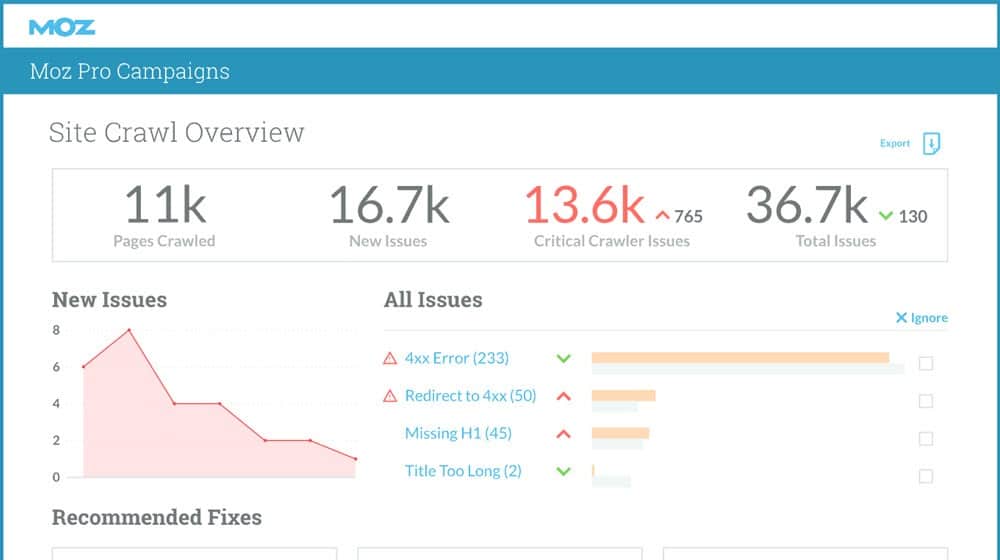
There are some issues you want to fix if you see them.
- Redirect chains. Nuke these ASAP; they're a huge hit for SEO.
- 4xx internal links. If you have internal links that don't work, remove or update them.
- Missing canonicals. Canonicalization is a big way you protect against link penalties, so make sure you have them in place.
- Proper noindexing. Particularly, money pages and certain kinds of system pages should be noindexed so you aren't flooding the search results with low-value pages.
These are the kinds of issues you can fix to directly enhance your search rankings. Other issues? They aren't so important. Things like temporary redirects, meta refreshes, certain crawler warnings, and the "content issues" they come up with are often not as important.
Fortunately, the Site Crawl report does prioritize categories of issues under Critical, Warnings, Redirects, Metadata, and Content. You can filter them and prioritize them as necessary.
This is also mostly a one-time task. You shouldn't be running an audit every week or even every month. Quarterly at most, but honestly, unless you're making big changes, annually might be fine.
#8: Competitor Identification
One of the more useful tools Moz offers, at least when you're starting out, is their True Competitor tool. The only reason this isn't higher on the list is because it's another case of "run this once a year" for value, rather than something you can do on a regular basis.
This is another tool under Competitive Research. Plug in your domain and preferred market, and run the tool. Moz will identify 25 domains that are your closest reasonable competitors when comparing metrics like DA/PA/BA, keyword overlap, link overlap, and general rivalry.

Some of these you almost certainly know. Others might be a surprise to you. It's a lot of useful insight the first time you use it, and has diminishing returns each time thereafter.
#9: Validate Keywords by Organic CTR
SEO has changed a lot in the last few years, and one of the big driving factors is Google's AI Overview. A lot of queries, especially informational queries, are just being answered in the SERPs instead of by sites, so people aren't clicking through.
When you do your keyword research and you're validating keywords to pick one to target, use Moz to check the organic CTR.

A keyword with high volume but a low organic CTR is either a keyword that is heavily ad-driven and doesn't get much organic value, or one that ends up a zero-click search because of the AI Overviews.
It can still be worth targeting these keywords, but you have to know why you're doing it. Specifically, you have to be optimizing for the AI Overview, rather than for direct eyes-on traffic. It's a different writing style and a different goal.
#10: Track SERP Features Contextually
This is another tip for filtering the data you're getting from Moz reports. Moz tracks SERP Features, which are things like rich snippets, image results, video results, knowledge graph data, and so on. A lot of these have been replaced by the AI Overview, but not all of them.

What you want to do is track SERP features for keywords you're targeting and links you're ranking for or trying to rank for. This helps you formulate your content to appear in these features, if possible.
You've also, as a user, probably found pages on Google where even the organic #1 is below the fold, and SERP features + AI Overviews + Ads drive everything down. These might not be worth targeting even if you land #1 just because you're still so far down the page. If you do, understand that you're creating a different kind of content to appear in a different format.
Similarly, you might want to contextualize your tracking by local vs. national results. A lot of Google is locally biased and even personalized, so SERPs aren't universal. You might be able to get more out of a query than you'd think if you can spin it with a local slant.
#11: Use Keyword Clustering
Keyword and topic clustering is the practice of taking a list of topics or keywords, and figuring out the relationships between them. Oftentimes, you'll get a list of 10 keywords and 3-4 of them are variations on the same topic. Covering each one as its own blog post means you have a lot of overlapping content across different URLs, which dilutes their value.
Clusters allow you to:
- Group topics into related clusters you can cover on a single more comprehensive page, for more value.
- Group topics into smaller but interrelated pages for a cluster of content, which can synergize and feed into each other with internal links.
You can also streamline your content production using clustering, since it saves time with planning.

There are a lot of keyword and topic clustering tools available, so you don't need to use Moz for it, but if you're already on the platform, you might as well. I recommend trying a few different options, though, just so you can get a feel for what the different clustering systems and AIs use to group topics.
Moz has three main authority metrics. Domain Authority is their comparative site-wide metric, and Page Authority is their page-level metric. So what is Brand Authority?
Brand Authority is Moz's evaluation of a site's strength as a brand, including things like name recognition, PR presence, brand value, and even merger and acquisition potential.

When it comes to content marketing, Brand Authority is a modifier that can explain why sites that don't seem like they should out-rank you are above you, when their DA and PA are lower. Brand consistency and value can be a significant modifier, and it's something worth exploring.
#13: Cover the Page Optimization Bases
Moz's on-page optimization audit is a report that shows you all of the things Moz thinks about a given page, and how you can improve them. They'll give you everything from critical issues to content and keyword suggestions.

The issue I have with this tool is that it doesn't quite do what people think it does. It's not a goal; you shouldn't be trying to create and refresh every piece of content until it has a perfect score on Page Optimization.
Instead, treat it like a checklist of things to do for posts before you publish them. Use it to explore additional secondary keywords you can incorporate into your text, technical issues you can solve site-wide, and best practices you can get into the habit of implementing with each post.
Once you have the bases covered, the Page Optimization tool loses a lot of value, but it can be very useful when you're getting your footing with SEO.
#14: Sanity-Check Backlinks with Spam Score
Your backlink profile is a hugely important part of SEO, but this means a lot of beginners to SEO focus on it more than they should. In particular, you are going to get spammy backlinks. That's just a thing that happens by existing online.
Newbies to SEO often build and update a disavow file to try to get rid of any sketchy-looking links. The problem here is that what you interpret as a bad link might not actually be bad in the eyes of Google. Meanwhile, if you disavow a neutral or good link, you lose the SEO value that would come from it.

By sanity checking your links with Moz's Spam Score, you can focus your efforts only on the links that might be harmful to you. One or two shady links here and there won't kill your site, but over-disavowing just might.
#15: Take AI Visibility with a Grain of Salt
With AI Overviews and AI tools that cite their sources growing more and more popular, Moz introduced their AI Visibility tool. This is meant to be an estimate of how visible your site is in various AI and LLM tools.

I'm pretty skeptical of this tool, for a few reasons. Being technically visible in an LLM doesn't necessarily mean you ever show up, and if you do, it doesn't mean people are going to recognize you or click through to you. On top of that, LLM content, even Google's AI Overviews, is very dynamic and customized. You can run the same query back to back and get different results with different sources.
AI Optimization is something worth keeping in mind, but I wouldn't use it as a KPI. Plus, Moz's AI Visibility requires their Standard plan, and isn't available under Starter; if it's the deciding factor on whether or not you're going to double your monthly costs, I'd skip it for now.
#16: Monitor Search Visibility Score
There are a lot of different ways to track your performance in search. A lot of people tend to use average rank, but this doesn't paint the full picture. I like using Moz's Search Visibility Score. This metric is a percentage of clicks you get based on your positions, so it's a more derived and more useful metric to monitor.

I will, however, caution you to avoid over-relying on specific metrics. It's easy to get hyper-focused on specific numbers, to the exclusion of other factors that may be more valuable, while also being harder to track numerically.
Likewise, don't get too caught up on minor movement. Google's search results are constantly shifting, day to day and week to week. Pay more attention to overall trends, not daily motion.
Any Questions?
Anything else you want to know about Moz, let me know in the comments. Like I said above, I want this to be a long-term living guide, so don't be afraid to chat.

Written by James Parsons
Hi, I'm James Parsons! I founded Content Powered, a content marketing agency where I partner with businesses to help them grow through strategic content. With nearly twenty years of SEO and content marketing experience, I've had the joy of helping companies connect with their audiences in meaningful ways. I started my journey by building and growing several successful eCommerce companies solely through content marketing, and I love to share what I've learned along the way. You'll find my thoughts and insights in publications like Search Engine Watch, Search Engine Journal, Forbes, Entrepreneur, and Inc, among others. I've been fortunate to work with wonderful clients ranging from growing businesses to Fortune 500 companies like eBay and Expedia, and helping them shape their content strategies. My focus is on creating optimized content that resonates and converts. I'd love to connect – the best way to contact me is by scheduling a call or by email.