
How to Build a Blog Writing Workflow That Actually Works
Written by 

Running a blog is a lot of work, and it's work that everyone approaches in a different way. The workflow that works for me and the one that will work for you may be different. But, critically, we all have to complete the same tasks.
How do you put together a blog writing workflow that works, instead of a bunch of busywork that makes you cringe just thinking about it?
There are some tricks and tips I can give you, stemming from my decade+ of experience in the field. First, though, one note: this is about a blog writing workflow, which means I'm going to leave out a lot of the blog management tasks that you'll also need to do. Stuff like keyword research, analytics monitoring, outreach, social media posting, and other tasks are important, but they're not part of this particular workflow.
If you want to incorporate all of that into a blog management workflow, go right ahead. Some of what I'll discuss below is even useful for building that workflow, too. Moreover, this entire workflow can sit as one chunk of an overall workflow, the "content creation" part to be specific.
Now, let's dig in.
Key Takeaways
- Writers fall into three workflow styles: rigid structure lovers, basics-only workers, and those who keep everything in their heads.
- Before writing, brainstorm topics from keyword lists, then research competitors, search intent, and related trends to inform your approach.
- Dump all ideas unorganized first, then build an outline with headings, sorting content into logical sections before writing.
- After writing, revise for tone, fix errors, add formatting, internal and external links, CTAs, and additional keyword variations.
- Finalize posts by adding images, metadata, alt text, and Schema markup before scheduling publication.
Step 1: Understand Your Personal Workflow Style
Before we get into any tangible, repeatable steps, we need to talk at a conceptual level.
Over the years, I've worked with a lot of writers and done a lot of writing myself. I've also talked to a lot of businesses about the writers they've worked with. I've met a lot of people with very different styles and approaches to content creation.

Broadly, you can divide people into three main groups.
- People who prefer as much of a rigid, repeatable structure as possible. These people prefer a deep and detailed process they can follow to the letter every time, which guarantees them results. Often, these people look for automation, use timers and tools, set up reminders, and build entire structures.
- People who need a little structure, but don't need much beyond the basics. These people tend to work with a few key programs, maybe use productivity timers or structured work schedules, or rely on teams and external validation to stay on track and on time. Critically, they don't need apps and reminders for every single detail, just the ones they tend to forget.
- People who keep everything in their heads and can bang out a blog post in a matter of a couple of hours. These people might have a couple of sticky notes with reminders of things to do, or a WordPress plugin that gives them an SEO checklist, but otherwise it's all in their heads.
There's no wrong approach here. However, if you try to pick one that doesn't suit you, you're going to hate every second of it. People in category three tend to burn out very, very quickly when they're forced to work in category one, and people in category one don't know what to do with themselves if they're left in category three.
Basically, just know yourself and how you work best, and build the structure that works for you. I'm mostly going to be covering the actual tasks in this guide and giving you some suggestions on how to implement structure around them, according to your preferences. If you're just getting started, these content writing tips for beginners can also help you find your footing.
Step 2: Decide on a Level of Structure
Following the above, it can also be worth thinking about the kind of structure you like. Some people prefer to just write in a notepad text file (or even a physical notepad!), while others like to use more blogging-centric tools. Some write directly in the WordPress compose window. A lot of this can depend on where you like to do your work, if you're using a phone, tablet, laptop, or workstation, if you have reliable internet, and so on.

The same decision applies to other elements of the workflow, too. What tools are you planning to use for your process? Do you need a pomodoro timer, a task board like Asana or Trello, a to-do list and a set of reminders? There are plenty of free content marketing tools worth exploring to help streamline your process.
Once again, there's no wrong approach here. Find what works for you, and don't be afraid to experiment with other tools and techniques that could refine your process. If they don't work for you, you don't have to stick with them, after all. There's a reason why most of these tools have free trials!
Step 3: Fuel Your Brainstorming with Your Keyword Lists
This is really step one of the actual workflow. The blog writing process begins by figuring out what topic you want to write about.
For the purposes of today's post, I'm assuming that you do batch keyword research and topic ideation at another time, and keep all of that information in relevant spreadsheets to help you with brainstorming later.

So, your first step is to open up whatever keyword and topic documents you have, give them a skim, and pick out a topic you want to write about.
Usually, if you're anything like most of the marketers I know, you have a lot of keywords, but not necessarily specific topics to go along with them. That's where brainstorming comes in. You'll want to think about the keyword you pick and brainstorm different topics that can be spun out of it. This can fuel a whole content cluster, or at least a handful of interrelated posts.
Step 4: Pick a Topic to Cover and Do Basic Research
Once you have a general idea of what keyword to cover and what approach you want to take, it's time to do some basic research.
For me, I usually do a handful of web searches. I'll search for the keyword, for the topic, and for a proposed title or two, since these can all have fairly different results. You can also search for variations on the topic, and as you dig into the results, it can inspire additional searches.
Sometimes, when I write a blog post, all it takes is one or two searches and my own knowledge to cover all the bases. Other times, I end up a dozen searches down a chain, researching different aspects of a topic.
A lot of this depends on how familiar you are with the topic. The deeper and more detailed research I do tends to be centered on client work for industries I'm not as familiar with, while the low-search topics are ones I've been covering for a decade and know like the back of my hand.

There's a lot to look at when you do this research.
- What approaches are other people taking in covering the topic?
- Are there alternative meanings or definitional challenges that muddy the topic?
- Are there related topics you should mention or use for internal links?
- Are there any recent news posts or ongoing trends surrounding the topic?
- What level of competition will you face in covering the topic?
This is also where you'll make some decisions about the content you want to write. The big one is search intent. Who are you writing for, and for what purpose? Is this informational, transactional, commercial? Which segments of your audience are going to be most receptive?
There are all sorts of marketing tools you can use to gain deeper insight into your chosen topic as well. In particular, competitive research tools are quite handy.
This is also one area where AI tools can be more useful. If all you're doing is pulling summaries and key points from content from your competitors, an LLM can do that fairly reliably. I still caution against using LLMs to create your content for you, but doing the research is a lot closer to fine.
Step 5: Write Down Everything You Want to Cover in the Post
Next up, just open up whatever composition app you want to use and start writing down all the key points you want to cover.
This is not an outline. It's really more of a pile of ingredients, all of the details you want to mention, the points you want to make, the links you want to include, and so on. Don't worry about organization or flow, just note it all down.

I often do this alongside the previous step. Do a web search, skim the top posts, pull the important details from them and note them down. Record sources for key data, find potential internal links, and develop an overall conclusion to the content.
Step 6: Build an Outline with Headings and Lists
Now that you have everything you think you want in your post, the next step is to start sorting it out.
I usually do this by building the H2 headings I want for each major section, and then sorting out the data to go in each. Some might only have one or two points, some might have more. The ones that have more can be broken up by formatting with lists if they're short, or H3s if they're longer.
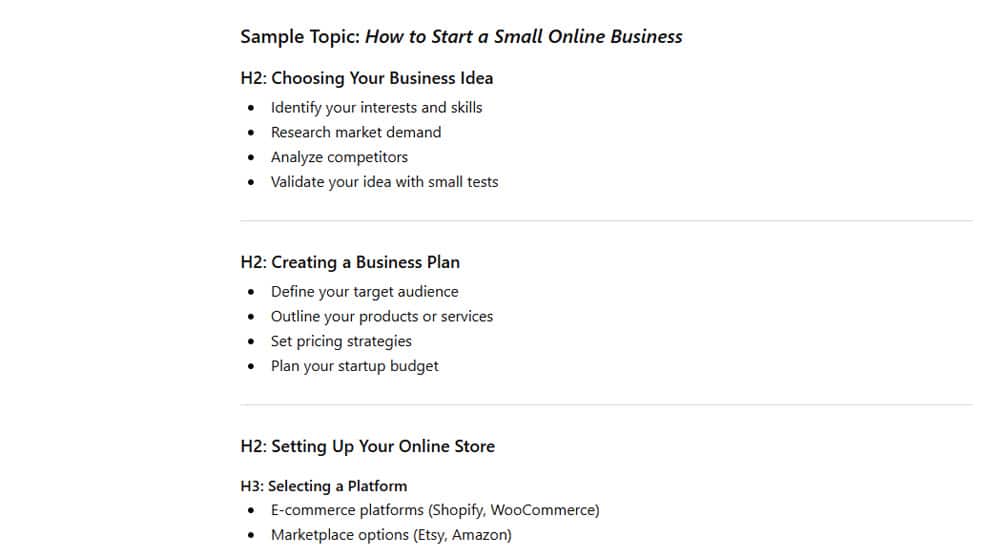
As you go, you might realize some of the details you wanted to include don't actually fit. That's fine; you can set them aside for a related cluster post, or for possible later inclusion if you think of a way for them to fit.
Step 7: Organize for Logical Flow and Relevant Conclusions
This step is kind of optional, depending on how used to blogging you are. I mostly do five, six, and seven all in one step, but I find that dividing them up helps when I'm talking to other people about the process. So, again, this is a matter of personal preference.
The goal of this step is to review the outline you've put together and make sure it has a solid logical flow, a throughline from premise to conclusion, and a point you want to make. If you're covering something informational, start with why you decided to cover it and end with why it's important to know about it. If you're convincing users of something, start with the pain point and end on the CTA.

If you've ever read a blog post that felt scattershot, like it was rearranged or that things don't quite make logical sense, what you're encountering is a post without logical flow. It's surprisingly important.
This is also a big reason why I recommend against using AI to generate blog posts for you. While they can mimic the look and feel of a blog post, they don't have the same grasp of logical flow that your readers will, so they can feel off-putting even if they're technically written well.
Step 8: Write the Content
You have research and a bunch of browser tabs open to references, and you have an outline, so now all you need to do is write the content.
It sounds easy, and once you've been doing it long enough, it kind of is. The real work of blogging isn't really in the act of writing; it's in all the other stuff you have to do. If only all we needed to do was write, right?

As you write, you may discover that some things you wanted to say don't support as much of a section as you intended. You might be able to fluff them up more, or you might roll them into another section, or you might cut them entirely. As long as it maintains the right logical flow, that's all fine. There have definitely been times when something I thought would support a whole section ended up just being two sentences, and vice versa.
Step 9: Revise and Refine the Content
Once your post is written, give it a once-over for basic editing.
- Smooth out phrasing and eliminate (or accentuate) repetitions.
- Make sure it fits your voice, tone, and style.
- Look for and fix typos and grammatical errors.
Feel free to use tools to do this, but make sure they're tools you trust. I know a lot of people like to use Grammarly, for example, but I also don't think Grammarly is any good anymore, and their suggestions make your content sound a lot more AI-generated and overly formal than they used to. It homogenizes the internet.
This is also where you can enlist a partner or team member. Having someone do a basic copy-editing pass can ensure they spot mistakes you might otherwise have missed.
Importantly, this is also where you want to do any brand management or regulatory compliance tasks, if they aren't things you're used to. For example, if you want to avoid mentioning brand trademarks, or if you want to make sure brand names you mention are consistently formatted, or if you have client requests to follow, this is a good place to review and make sure you're complying.

If you're just writing for yourself, the bar is lower, but anything you want to make sure you always (or never) do in your posts, this is the point to review it.
Step 10: Add Formatting, Links, CTAs, and Other Text Enhancements
Next up is the text enhancement pass. This is where you can:
Add bold, italics, underlines, highlights, emojis, symbols, and other bits and bobs to the text to spice things up and make it easier to skim.
Add any links, both internal and external, that you didn't add in previous passes. Cite your sources, link to related content, and so on.
Add any additional calls to action that you want to help ensure your blog is doing its job.
Add more keywords, including long-tail keyword variations, that you want to target with your content.

Some of this can be done with tool-based suggestions, particularly from tools like MarketMuse and Link Whisperer.
Step 11: Add Images, Meta Data, and Make the Post Publish-Ready
Finally, wrap things up. Add images, whether it's stock photos, screenshots, graphic design, or whatever else suits your post. Add metadata, including post meta titles and descriptions, image alt text, and Schema markup as relevant. Do all the little SEO checklist stuff you need to round out your workflow.

Once it's all ready to go, all that's left to do is schedule the post for publication. From there, you can transition onto other parts of your workflow.
- Mark off the topic in your keyword research documents.
- Add internal links to the new post in old relevant content.
- Post on social media and promote your new content.
All of that goes beyond just writing, though, so it's part of another workflow entirely.
What do you think? How does this align with your existing workflow? Is there anything you think I missed? Let's talk about it in the comments!

Written by James Parsons
Hi, I'm James Parsons! I founded Content Powered, a content marketing agency where I partner with businesses to help them grow through strategic content. With nearly twenty years of SEO and content marketing experience, I've had the joy of helping companies connect with their audiences in meaningful ways. I started my journey by building and growing several successful eCommerce companies solely through content marketing, and I love to share what I've learned along the way. You'll find my thoughts and insights in publications like Search Engine Watch, Search Engine Journal, Forbes, Entrepreneur, and Inc, among others. I've been fortunate to work with wonderful clients ranging from growing businesses to Fortune 500 companies like eBay and Expedia, and helping them shape their content strategies. My focus is on creating optimized content that resonates and converts. I'd love to connect – the best way to contact me is by scheduling a call or by email.







Comments